Every week, businesses spend thousands of dollars on email marketing agencies, freelance designers, and CRM subscriptions — for a single campaign. A luxury brand aesthetic. A fully responsive mobile layout. A gold call-to-action button that actually converts. That's the cost of looking professional, right?
Wrong. I built that campaign. In 4 minutes and 38 seconds. With zero dollars spent on design. And I recorded every second of it.
This article is the complete step-by-step guide to exactly how I did it — using Claude AI to generate a production-ready HTML email, and Brevo to deploy it at scale. No coding knowledge required. No design background needed. Just a clear brief and a free email campaign builder that's already available to you right now.
Who this is for: Business owners, consultants, marketers, and entrepreneurs who want to run professional email campaigns without paying agency rates — and without spending weeks learning design software. Whether you're building email newsletters, promotional sequences, or welcome campaigns, an AI-powered approach removes traditional barriers.
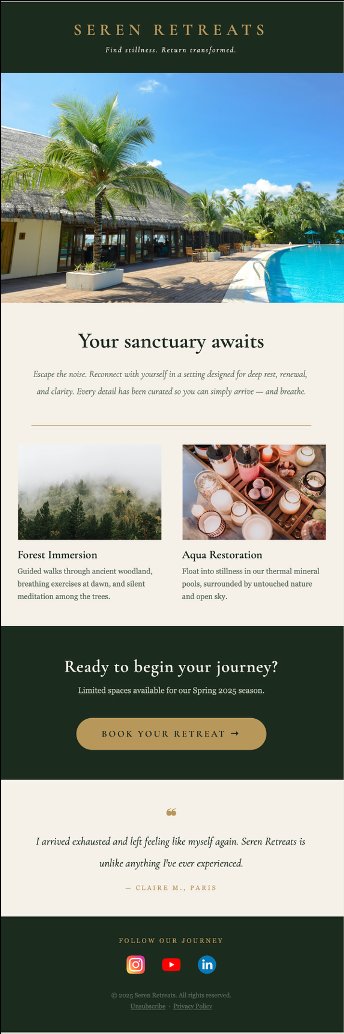
The finished email campaign as it renders in Brevo — fully responsive, all links working, ready to send to your contact list. This design was generated from a single Claude AI prompt in under 5 minutes.
Why this matters for your business — and what it's replacing
Email marketing remains one of the highest-ROI channels available to businesses of any size — consistently delivering $36 to $42 in return for every $1 spent, according to industry benchmarks. Yet for most small and mid-size businesses, the barrier isn't strategy. It's execution cost. An effective email marketing ROI depends less on complexity than on consistent execution and professional presentation.
A professionally designed email campaign from an agency typically costs between $3,000 and $15,000 per campaign. That's before any CRM subscription fees — Salesforce Marketing Cloud, HubSpot, Marketo — which can run $50,000 to $200,000+ per year for enterprise licenses. For small business email marketing, these costs are prohibitive.
What we're doing in this guide is eliminating that cost entirely through an AI email marketing tool approach. Not by compromising on quality — but by using AI automation tools that didn't exist two years ago. The result is a campaign that looks like it came out of a premium agency. Because in terms of output quality, it did. Using a free email campaign builder combined with Claude AI represents a paradigm shift in how businesses approach email design without coding.
The core insight: The expensive part of email marketing was never the send. It was the design and the HTML development. AI has solved that. The rest — deployment, delivery, analytics — is already free or near-free with tools like Brevo. An HTML email template generator powered by AI changes the economics entirely.
The two tools you need — nothing else
This entire workflow runs on exactly two tools. You don't need Figma. You don't need a developer. You don't need a $200/month email platform. An AI powered marketing solution simplifies the traditional tech stack.
Tool 1 — Claude AI (claude.ai)
Claude is Anthropic's AI assistant, and it is — in my professional opinion after years in enterprise consulting — the most capable AI for structured technical output. Unlike ChatGPT's more conversational style, Claude excels at generating clean, production-ready HTML with precise layout control. It also follows complex multi-constraint briefs reliably, which is exactly what email design requires. Claude AI serves as your email design without coding solution, handling layout, typography, and responsiveness automatically.
The free tier is sufficient for this workflow. A Claude Pro subscription ($20/month) gives you higher usage limits, but isn't required to follow this guide.
Tool 2 — Brevo (brevo.com)
Brevo is a professional email marketing and automation platform with a free tier that includes up to 300 emails/day and unlimited contacts. It supports custom HTML code import, has a built-in media library with free stock photos via Pexels, and renders campaigns across both desktop and mobile layouts. Brevo's free email campaign builder serves growing businesses and small enterprises perfectly. For creating email newsletters and marketing sequences, it is the most cost-effective professional email infrastructure available today.
Step 1 — Define your campaign concept
Clarify the brand, the message, and the assets
Before opening Claude, you need to have three things clear in your mind:
- The brand identity: Colors, tone, what it should feel like. Luxury? Warm and approachable? Corporate and authoritative?
- The goal of the email: Drive bookings? Promote an offer? Announce a launch? The call-to-action must be specific.
- Your real links: The CTA button destination (e.g. your Calendly booking page), and your social media profile URLs (Instagram, LinkedIn, YouTube, etc.).
For this demo, I created a fictional luxury wellness retreat brand called Seren Retreats — dark forest green palette, gold accents, high-end spa aesthetic. The CTA linked to my real Calendly booking page, and the social icons linked to my actual profiles, so I could verify click-through in the live test.
Step 2 — Write the perfect AI prompt (the step most people get wrong)
Here is where most people fail with AI-generated email design. They write something like: "Make me a nice marketing email for a spa." And they get something generic, forgettable, and structurally broken on mobile.
Professional AI output requires a professional brief. The more specific the constraint, the more precise the result. This is exactly how you'd brief a real developer — and Claude responds to that level of detail with production-grade output. This approach to building an email with AI ensures your results match your brand standards.
Pro technique: If you're not sure how to write a technical design brief, use a two-step process. First, describe your vision in plain language to Claude and ask it to write the technical prompt for you. Then copy that generated prompt into a fresh conversation and ask Claude to build the email from it. This is what I did — and it produces dramatically better results than writing the prompt yourself from scratch. This two-phase approach works whether you're creating email newsletters or promotional campaigns.
What your prompt must include
- Exact hex color codes (e.g. #2C3E2D for forest green, #C9A84C for gold)
- Font specifications (Google Fonts work well — e.g. Cormorant Garamond for headings)
- Layout structure (header, hero image section, body copy, CTA, footer)
- Image URLs (hosted images from Brevo's media library or your own CDN)
- Exact CTA button text and destination URL
- Social icon links (full URLs for each platform)
- Mobile responsiveness requirements (single-column layout on screens under 600px)
- Padding and spacing values (consistent internal spacing prevents the broken look)
Example prompt structure
Here is the structure of the prompt I used (adapt it to your brand):
Generate a complete, production-ready HTML email for a luxury wellness brand called [Brand Name].

Brand identity: [color palette, font, tone description]
Header: Logo text centered, dark background
Section 1: Hero image [URL], headline "[Your headline]", subheadline
Section 2: Three feature blocks with icons or dividers
Section 3: CTA button — "[Button text]" linking to [your URL]
Footer: Social icons (Instagram: [URL], LinkedIn: [URL], YouTube: [URL])

Technical requirements:
- Max width 600px, centered
- Mobile-responsive: single column below 600px
- Internal CSS only (no external stylesheets)
- All images with alt text
- CTA button: background [hex], text [hex], padding 16px 40px, border-radius 0
- Font: [Google Font name] for headings, Arial fallback for body
Step 3 — Generate the HTML with Claude
Paste, generate, download
Open a fresh Claude conversation at claude.ai. Paste your complete prompt. Hit send.
Within seconds, Claude returns a complete HTML file. At this stage, don't panic if images don't appear in the raw code preview. If your images are hosted via Brevo's media library, they'll only render once the code is imported into Brevo. The structure, typography, button styling, and spacing are all already correct. This HTML email template generator approach ensures consistency.
What you can review immediately in the HTML:
- The overall layout and section structure
- Color application on headers and CTA buttons
- Font rendering and text hierarchy
- Footer link structure and social icons
If something looks off — a color is wrong, a section is missing — simply tell Claude in the same conversation: "Change the CTA button color to #C9A84C and add a 32px top margin above the footer." It will regenerate. This iterative refinement process typically takes 1–2 exchanges.
Step 4 — Source your images with Brevo's free media library
This is the step that makes the campaign look expensive. Brevo integrates directly with Pexels, giving you access to thousands of high-quality, commercially licensed stock photos — completely free, directly inside the platform. For any email marketing automation AI workflow, having free access to professional imagery is critical.
Getting hosted image URLs from Brevo
- Log into Brevo → go to Campaigns → Email Campaigns
- Open any campaign or create a placeholder one
- Navigate to the Media Library tab
- Search Pexels directly within the interface for your aesthetic (e.g. "luxury pool", "misty forest spa", "wellness retreat")
- Select and save your chosen images to the library
- Copy the hosted URL for each image — these are the links you include in your Claude prompt
With real hosted image URLs embedded in your prompt before generating the HTML, Claude places them in the exact right position within the layout. No manual drag-and-drop. No resizing. No positioning work. This Brevo email tutorial approach streamlines the entire workflow.
For your real business: Use this same process with your own brand photos. Upload your image to Brevo's media library → copy the hosted URL → include it in your Claude prompt. Your brand photography will be placed with the same precision as the stock images.
Step 5 — Import into Brevo and launch
From HTML file to live campaign in 3 minutes
- In Brevo, go to Campaigns → Email Campaigns → Create a Campaign
- Fill in campaign name, subject line, sender name and email address
- On the design screen, click "Code your own"
- Select "Paste your HTML code"
- Delete the placeholder content and paste your Claude-generated HTML
- Click Save → then Preview
The preview renders the complete email — all images, the CTA button, social icons, mobile layout — exactly as designed. This is the moment where it stops looking like code and starts looking like a campaign ready for email marketing automation.
Before you send: the final checklist
- Send a test email to yourself — check desktop and mobile rendering
- Click every link — CTA button, social icons, unsubscribe link
- Review the subject line — avoid spam trigger words (FREE, URGENT, !!)
- Check the sender name and reply-to address
- Verify your contact list is properly segmented
The bonus capability — visual editing after AI generation
Here's something that surprises most people: even though your email was generated as raw HTML code, Brevo lets you open it inside a visual drag-and-drop editor afterward.
This means that once the AI has built the structure, you retain full visual control. Want to change a headline? Click on it and type. Want to move the CTA button up? Drag it. Want to test a different subject line? Done — no code required. You get the precision and layout control of AI-generated HTML, combined with the simplicity of a visual editor. This integration represents the future of no-code email design AI tools, giving you creative flexibility alongside technical precision.
What the result actually looks like
I sent the finished campaign to myself as a test. I opened it on my iPhone. The verdict:
- The header rendered cleanly with the brand name in the correct font weight and spacing
- The hero image was sharp, full-width, and loaded instantly
- The gold CTA button opened my Calendly booking page directly — working link, zero latency
- Each social icon (Instagram, YouTube, LinkedIn) linked to the correct profile pages
- The mobile layout collapsed into a single column cleanly, with appropriate padding
- The footer rendered with correct copyright and unsubscribe link
It looked better than email campaigns I've seen from brands with full in-house marketing teams and six-figure software budgets. Not because AI is magic — but because AI removes the friction between a clear brief and a professional output. The bottleneck was always execution cost. That bottleneck is gone. When you're building email campaigns with AI, you're competing on clarity and strategy, not budget.
Scaling this workflow across your business
Once you've built your first campaign this way, the template is reusable. You can:
- Build a master brand prompt — your colors, fonts, logo URL, social links — and reuse it for every campaign, only changing the content
- Create seasonal variants — the same structural template with different images, subject lines, and offers
- A/B test subject lines and CTAs within Brevo's built-in testing tools, without touching the design
- Set up automated sequences — welcome series, onboarding flows, re-engagement campaigns — all using the same AI-generated HTML foundation
For businesses currently paying agencies $5,000 to $15,000 per campaign, the economic case is straightforward. For businesses that haven't been doing email marketing at all because the cost seemed prohibitive — this workflow removes that barrier entirely. Whether you're building one campaign or running continuous email newsletter marketing with AI, the model scales identically.
The bottom line: Email marketing automation is no longer a budget problem. It's an attention problem. The tools exist, they're free or near-free, and they're genuinely capable of producing enterprise-quality output. The businesses that figure this out in 2026 will have a compounding advantage over those that don't — because their customers will be engaged, nurtured, and converting while their competitors are still waiting for the agency to send a draft. Your small business email marketing now has competitive parity with larger organizations.
Common questions — answered
Do I need any coding knowledge?
No. You copy and paste code that Claude generates. You never write a single line yourself. If something needs to change, you describe it in plain English and Claude adjusts it. The most technical thing you'll do is paste text into a box.
What if the images don't show up after pasting into Brevo?
Make sure your image URLs are fully hosted (i.e., they're public https:// links — not local files on your computer). Brevo's media library URLs work perfectly. Google Drive links do not — they're not publicly accessible in the right format.
Can I use this for cold email outreach?
This workflow is optimized for opted-in email marketing — people who have subscribed to your list. Cold outreach has different legal requirements (CAN-SPAM, GDPR) and deliverability considerations. For cold outreach, the HTML template approach is still valuable, but your sending infrastructure and list sourcing strategy need to be handled separately.
What's the difference between using Claude and using Brevo's built-in AI?
Brevo has a basic AI subject line generator and some templating tools. Claude AI marketing capabilities are orders of magnitude more powerful for layout generation — it can execute a precise multi-section brief with exact typography, spacing, color codes, and link placement that Brevo's native tools cannot match. The two tools serve different parts of the workflow.
Is Brevo actually free?
The free tier includes unlimited contacts and up to 300 emails per day — which covers most small businesses' needs entirely. Paid plans start at $9/month for higher sending volumes. There are no hidden fees for using the HTML import feature or the media library.